Orbot AI: Android assistant for chat, image, and document workflows
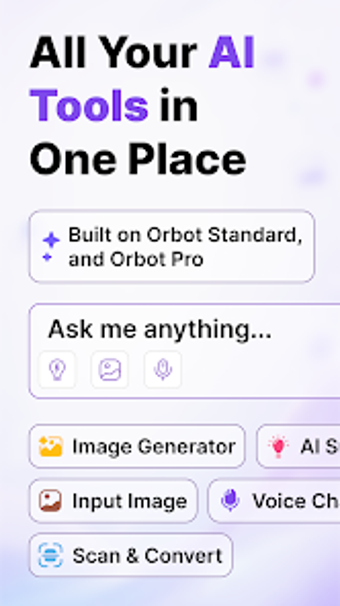
Orbot AI: Smart Chat Assistant from Qzee Games is an Android productivity app designed as a mobile-first personal assistant for research, writing, and document handling in on-the-go workflows. The app combines multi-modal AI chat, image generation, voice-to-text, OCR, and translation to answer queries, create illustrations, analyze photos, extract text, and summarize scanned documents. Built for students, professionals, and creatives, it centralizes chat history and multi-input workflows on a single interface to support research, drafting, and quick document processing.
What advanced outputs can Orbot AI produce for creative and analytical tasks?
The app gives a choice between standard and premium AI models, which lets users pick model complexity for different tasks. Chat replies include explicit options to copy, share, or regenerate responses, supporting iterative drafting. Its image generator produces distinct results, specifically cited as
- unique illustrations
- concept art
- wallpapers
How does the assistant support everyday writing and document capture?
Orbot AI includes a writing assistant that drafts essays, emails, cover letters, social captions, and blog posts, adapting tone as needed. For physical documents it exposes a Scan & Convert tool that handles receipts, handwritten notes, and printed pages; extracted text is available for editing and further composition, which helps users move from paper to editable text inside a single app environment.
Can non-specialists use voice commands and image analysis effectively?
Voice Chat accepts natural spoken input and supports hands-free interaction, making the app suitable for quick queries while mobile. Image input accepts uploaded photos or live camera captures and can identify or explain objects, plants, or text within those images. The app also keeps a persistent chat history so users can resume earlier conversations and follow up on previous analysis without rebuilding context.
How does the app integrate with Android workflows and who built it?
Orbot AI is distributed via the Google Play Store and requests standard camera and microphone permissions to enable scanning and voice features on Android devices. The developer moved from simulation games into AI productivity, and user feedback highlights the convenience of having multiple AI tools in one place. These platform choices make the app a mobile-first tool rather than a desktop-centric solution.
Who benefits most from Orbot AI and where it falls short
Orbot AI is a practical option for mobile professionals and creatives who need consolidated AI assistance for drafting, visual work, and quick on-device queries. It suits Android-centric solo contributors and small teams that accept device-level permissions. The app is less fitting for environments that require cross-platform desktop integration or centralised enterprise administration.